Key Takeaways
- AI app builder for enterprises uses artificial intelligence to generate, speed up, or assist in building business software using natural language prompts and visual editors.
- AI app builders can speed up delivery, prototyping, and business-team participation but still need developer oversight.
- Building an app involves defining the idea, choosing a builder, prompting, refining, testing, and publishing.
- Key risks include security gaps, vendor lock-in, unverified SDKs, limited visibility into code, and production scaling issues.
- The cost to create business apps with the help of an AI app builder varies from $19/month to $199/month with Nativly.
What if building an enterprise app started with a business idea, not a backlog of code? AI app builders are changing how teams turn everyday ideas into apps, helping them move from concept to prototype faster while keeping security, integrations, and oversight in focus.
In this guide to building business apps with AI, you will learn all about the AI app builder for enterprises. It includes all the reasons why enterprises turn to AI app builders, steps to create a business app with an AI app builder, different types of business apps, and risks involved in choosing an AI app builder.
Let’s get started with the same.
What is AI-Powered Enterprise App Development?
AI-powered enterprise app development is the complete process of creating and deploying large-scale business software that integrates artificial intelligence.
This spans two distinct shifts: building apps with AI and even using AI to create the apps themselves. It is one of the processes of creating the large-scaled business focused software apps with the help of AI
AI builder for enterprises has become a strategic priority for organizations seeking to enhance efficiency and speed up the app development process.
AI-driven application development is the complete use of artificial intelligence across the different stages of the application development cycle, converting app ideas into reality.
Here, enterprises face unique challenges such as complex integrations, strict security requirements, and governance needs that consumer-focused AI tools cannot handle.
AI app development covers a broader surface than traditional web apps. Modern AI applications do inherit governance as well as security requirements from the data platform that traditional web apps rarely face.
The core components of AI-Powered Enterprise App Development:
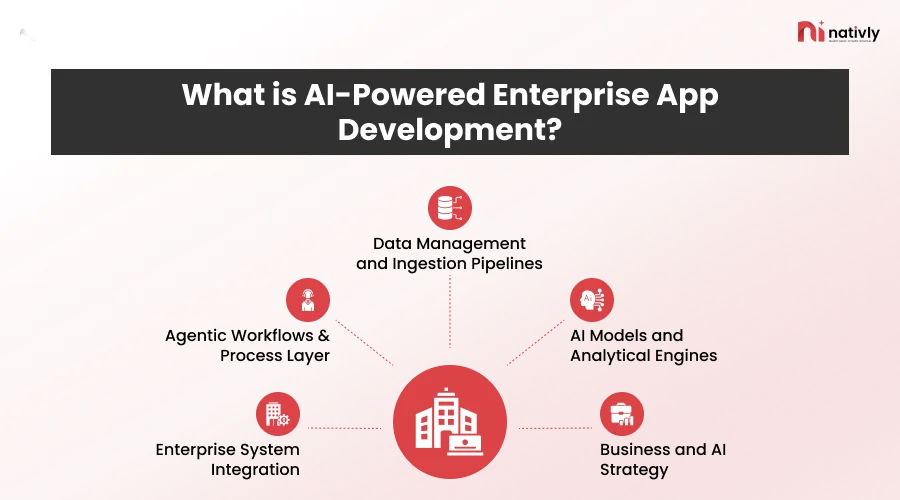
1. Data Management and Ingestion Pipelines
The data management and ingestion pipelines are the foundational engine of AI-powered enterprise app development because these apps help users transform the chaotic, raw enterprise data into the clean, contextual fuel that AI models can trust.
It is a component that turns fragmented, raw data into clean, real-time context that the machine learning models and the generative AI (GenAI) systems require.
2. AI Models and Analytical Engines
The AI models and analytical engines act as the core “brain” and “processing center” that turn the raw enterprise data into automated decisions, predictions, and intelligent actions.
This is a core component that shifts applications from passive, rule-based systems to adaptive decision-making systems. These are the models that offer the capabilities to learn, reason, and generate NLP & LLMs, computer vision, as well as agentic reasoning.
3. Business and AI Strategy
A business model and AI strategy act as a blueprint that shifts processes from isolated, experimental tool-building to a coordinated driver of measurable business value.
It is the core component because it ensures that the technology resolves measurable business issues rather than existing as a standalone technical experiment. The risk and compliance business strategy are core pillars that dictate whether a company innovates safely or faces struggle.
4. Enterprise System Integration
Enterprise system integration is the main component because the AI models cannot generate useful business value in isolation. This integration bridges the gap between isolated data, legacy back-ends, and intelligent agents.
The enterprise integration eliminates data silos, enabling retrieval-augmented generation, powers agentic workflows, and further resolves the data debt.
5. Agentic Workflows & Process Layer
Agentic workflows and the process layer act as the central command center in AI-powered enterprise applications. This component moves the software architecture away from rigid, hardcoded paths towards goal-driven, adaptive execution.
The agentic workflows and process layer for enterprise AI app development result in multi-step and end-to-end orchestration.
Here, one of the important questions is “why are enterprises turning to AI app builders?”
Enterprises are turning to AI app builders to accelerate software delivery and even empower non-technical staff to create custom tools.
Why Are Enterprises Turning to AI App Builders?
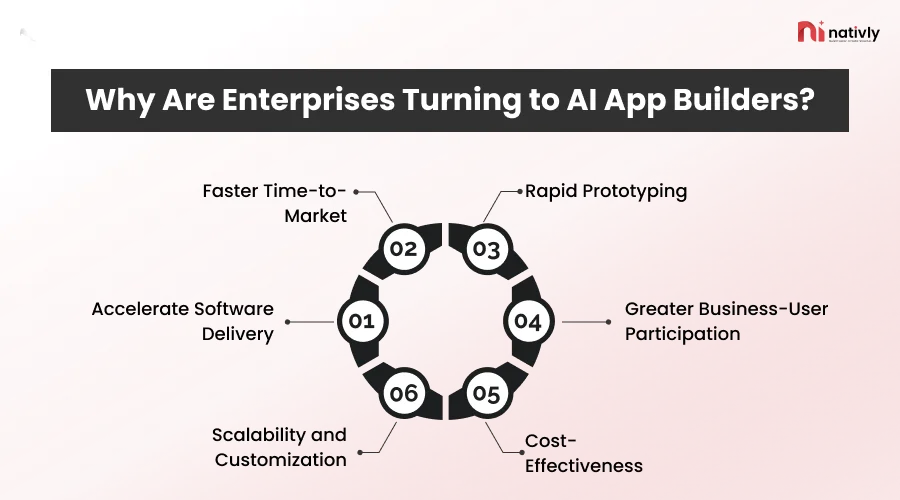
Enterprises are rapidly adopting AI app builders to accelerate software delivery, cut engineering costs, and empower their teams. AI app builder for enterprises assists users with rapid prototyping, greater business-user participation, cost-effectiveness, and scalability.
Here are the complete reasons to discuss:
-
Accelerate Software Delivery
AI app builders are designed to understand natural language processing (NLP) and LLMs and then turn these prompts into complete functional apps within minutes or hours.
-
Faster Time-to-Market
AI app builders offer speed by automating the repetitive technical tasks, turning the natural language into code, and then cutting down the traditional engineering cycles from months to days.
-
Rapid Prototyping
AI app builders are built in a way to test ideas, validate workflows, and build minimum viable products before making any larger investments. Rapid prototyping compresses months of software design and development into hours or days, which allows teams to validate ideas before investing heavy capital.
-
Greater Business-User Participation
Greater business user participation is the primary driver that forces enterprises to adopt AI app builders. This is a system that fundamentally shifts software creation from a technical bottleneck to a collaborative process.
-
Cost-Effectiveness
Cost-effectiveness is the primary reason that enterprises adopt AI app builders because they drastically slash development overhead and accelerate time to market. These builders reduce the amount of manual coding and help businesses make better as well as faster decisions.
-
Scalability and Customization
The AI app builders balance customization and scalability by combining the low-code flexibility with the automated cloud infrastructure. These apps function more as rapid prototyping and even initial growth enablers rather than the true replacements for enterprise-grade engineering.
But now, most of the startups and entrepreneurs ask, “How can I build a business app with AI?”
Well, there is a complete process, from market research, selecting the features, writing a detailed AI prompt, refining, testing, and deploying the app on the platform.
For more, let’s get ahead with “How do you build a business app with AI” in detail in the next section.
How Do You Build a Business App With AI App Builder?
To create a business app with AI, it is essential to define a core issue, generate or low-code build the interface and database via plain-language prompts, and deploy the application.
Here is the complete list of steps one should figure out in detail:
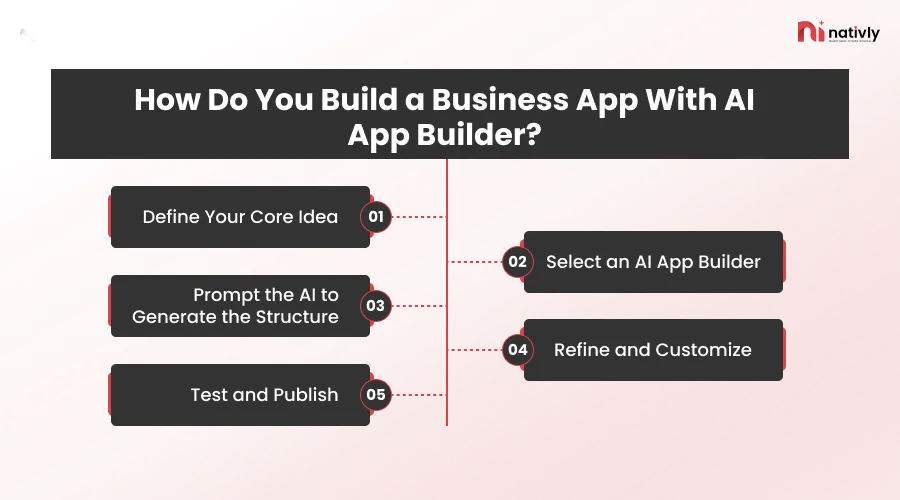
Step 1: Define Your Core Idea
This is the very first step, where you need to state the complete idea for your application that you want to build.
Clarify every aspect of your business idea, like what you want to build, what the key audiences are, for whom you want to build, monetization strategies, and what scope it includes for expansion. It is important to validate an app idea before building it with Nativly.
Step 2: Select an AI App Builder
Now, you should select an AI app builder by evaluating the merits and demerits of each aspect as per the goal of your project.
You should know the details of how many types of AI app builders are available in the market and evaluate the tools based on full-stack and deployment infrastructure.
Step 3: Prompt the AI to Generate the Structure
In this step, you should generate the app structure, database schema, and core layout as the third step in an AI app builder. Use the prompt that defines your data entities, relationships, and user roles.
State the complete prompt stating what you want in the app, what type of functionalities and features you want your app to have, in case you build it from scratch and via an AI app builder.
Step 4: Refine and Customize
It’s time to refine your prompts (Add or subtract) in order to make your app as per the project goal. Refine and customize the user interface and logic with the help of conversational commands and visual tools.
Additionally, for customizing the app, you should use the conversational UI commands, fine-tune data, and logic roles. Most AI app builders offers drag and drop editor that helps users to modify their UI, visual elements, and even page layouts.
Step 5: Test and Publish
Testing and publishing is the fifth step in building business apps with an AI app builder that comprises a combination of automated checks, human review, and deployment tasks to ensure that the app is stable before it reaches the actual users.
Now, you should publish the app on the defined platform as per the objective of your project. Also, keep an eye on app maintenance when it comes to creating an app with the help of an AI app builder.
Another important question that most of the businesses ask is, “How can I choose the best AI app builder for my project?”
Well, for selecting the best AI app builder, you need to look at what type of skills you possess and then match them with the tool. Another step is to define the app type, evaluating the code ownership and export options. And lastly, pricing.
Yes, pricing comes last, not the first step. Because here the utmost requirement is to build the app seamlessly and effectively so that it functions and works as required.
Another key question that often bothers enterprises is, “What is the key difference between AI app builder vs. Low-code vs. no-code vs. custom development”
Here, the measure of differences lies in how the app is built. AI app builders generate apps with the help of language prompts. While low-code builders output visual projects with platform-specific scripting on vendor runtimes.
On the other hand, the primary use of visual workflows is to support plugins, scripts, or other extensions.
You might be also interested to know “How to build an iOS and Android App without coding in 2026?”
Let’s understand the complete list of differences in the next section.
AI App Builder vs. Low-Code Vs No-Code vs. Custom Development
It is important to learn the difference between AI app builder vs. low-code vs. no-code vs. custom development, because it will help you to identify what you want for your app.
Here is the complete list of differences to consider:
| Point | AI App Builder | Low-Code | No-Code | Custom Development |
| Short description | Generates apps from plain-language prompts using AI | Visual builder with hand-coding for complex logic | Drag-and-drop builder with no coding at all | Apps coded from scratch by developers |
| How it’s built | Prompt, then AI-generated UI, logic, and data | Visual blocks plus custom code | Pre-built templates and components | Full software development lifecycle |
| Who builds it | Business users, with developer review | Developers and tech-savvy “citizen developers” | Non-technical business users | Professional engineering team |
| Speed | Minutes to days | Days to weeks | Days to weeks | Months |
| Customization | Medium; limited by what the AI generates | High within platform limits | Low; template-bound | Unlimited |
| Scalability | Good for internal tools, uneven for complex systems | Good | Limited at enterprise scale | Highest |
| Security and governance | Varies widely; needs review and guardrails | Strong on enterprise platforms | Platform-dependent, limited control | Fully controlled; built to your standards |
| Integrations | Common APIs, with gaps for legacy systems | Wide connectors plus custom code | Pre-built connectors only | Any system, including legacy |
| Code ownership/lock-in | Depends on vendor (code export varies) | Moderate lock-in | High lock-in | You own the code |
| Upfront cost | Low | Low to medium | Lowest | Highest |
| Long-term cost | Licence fees plus review and rework | Licence fees grow with users | Licence fees grow with users | Higher build cost, lower licence dependency |
| Maintenance | Vendor updates plus human QA | Shared (vendor and your team) | Mostly vendor | Your team or a partner |
| Best for | Prototypes, internal tools, fast pilots | Workflow and business apps needing some logic | Simple forms, dashboards, small tools | Regulated, complex, mobile-first or proprietary products |
| Main limitation | Output needs human review for production | Skills still needed; platform ceiling | Can’t handle complex logic | Slow and expensive |
Also Read: AI App Builder vs Hiring a Developer
Following these differences, let’s get ahead with what types of business apps you can build when it comes to AI app builder in the next section.
What Types of Business Apps Can You Build with AI App Builder?
When it comes to the different types of business apps, it is important to know all the types in order to select one.
Let’s discuss all the types below:
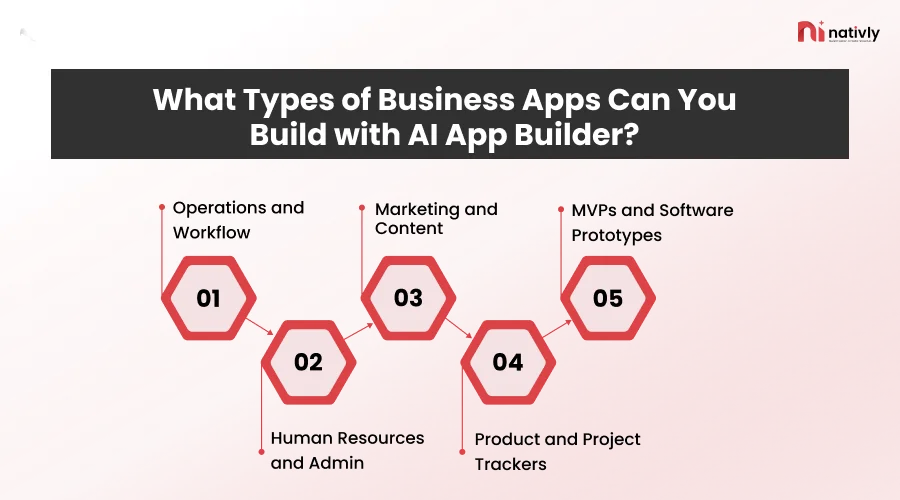
1] Operations and Workflow
Streamline workflows, vendor management, approvals, and supply chain tracking. These apps directly eliminate manual labor, speed up execution, and replace slow verification tasks with automated intelligence.
2] Human Resources and Admin
Human resources and admin tasks are a primary focus for AI app builders because the HR team spends roughly 14 hours per week on repetitive, manual coordination.
3] Marketing and Content
The marketing and content apps are the key types of business applications built with AI app builders because they automate the repetitive workflows, scale personalization, and drastically reduce the time and cost required to reach customers.
4] Product and Project Trackers
The product and project trackers are the key types because they rely on structured data models, straightforward user interfaces, and automated workflows that the natural language prompts can generate.
5] MVPs and Software Prototypes
The MVPs and prototypes are the core building blocks built using an AI app builder because these platforms remove the traditional bottlenecks, which allows founders and teams to turn ideas into functional software.
Now, as you have decided the different types of apps that you can build with the AI app builder, let’s get ahead of the risks of creating apps with the AI app builder in the next section.
What are the Risks of Creating Apps with AI App Builder?
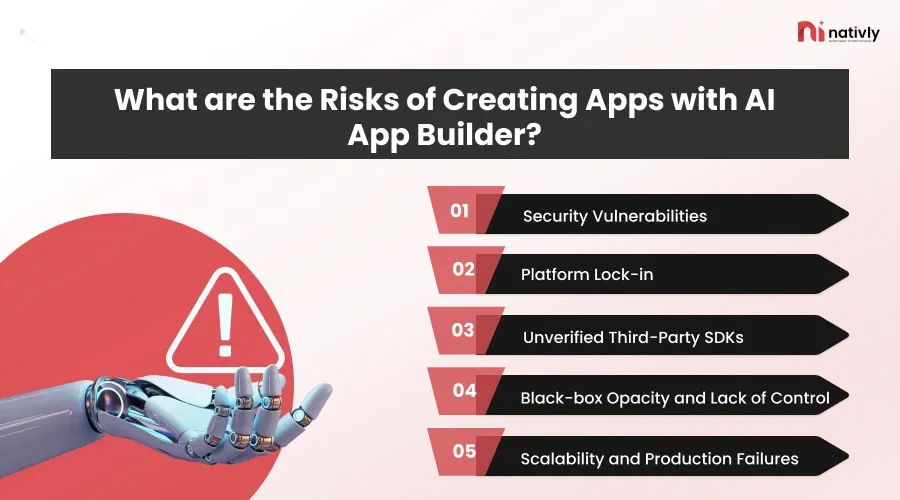
The key risks of creating apps with AI app builder are security vulnerabilities, unseen code and debugging nightmares, platform vendor lock-in, and escalating hidden costs.
Here is the complete list of risks of creating apps with AI App Builder:
-
Security Vulnerabilities
This is the core risk when it comes to building business apps with AI.
To a bot, you share your complete data, the idea, your attachments related to the types of audience you will cater to, and different types of features you want to include in it, etc.
AI tools frequently drop the API keys that might result in losing your precious data.
-
Platform Lock-in
Once you start building an app with one AI app builder, they lock you in via plans and without offering the complete source code transfer certification.
This might result in losing your entire plan with the AI app builder, and you might get stuck with that particular AI app builder. Additionally, a few of the AI app builders do not offer full ownership of the source code.
-
Unverified Third-Party SDKs
The unverified third-party SDKs are the pre-built code packages that AI app builders for enterprises use to add features like payments, analytics, or ads.
Using these unverified third-party SDKs creates a core risk when it comes to building an enterprise app with an AI app builder.
-
Black-box Opacity and Lack of Control
AI platforms building enterprise apps often obscure how logic is processed behind the scenes. When major bugs or any unexpected behavior occur, it becomes difficult to see the complete depth of backend code.
Thus, correcting errors on the backend is difficult and a risk that can occur while using an AI app builder to build business apps.
-
Scalability and Production Failures
Scalability and production failures happen with AI app builders because these tools are optimized for rapid demos and happy-path prototypes rather than resilient, multi-user systems.
Scalability breaks down in an enterprise app because of flat and inefficient databases, feature-by-feature bloat, and unbounded API and model costs.
To avoid these risks, you need to connect with an AI app builder that offers complete support to build a business app with AI, along with expert help.
Bonus Read: Why Your AI-Generated App Got Rejected by the App Store?
How Much Does It Cost to Build an Enterprise App With an AI App Builder?
Building an enterprise app with an AI App Builder such as Nativly can cost from $19 to $199 per month. This cost varies significantly depending on whether you mean no-code/low-code AI development platforms or enterprise infrastructure platforms.
For enterprises who want to know, “How much does it cost to create an app with an AI app builder?”
This cost to create an app with an AI app builder does depend on the infrastructure you select, the type of app, and the infrastructure of the app.
Here is the complete list of the costs to build an enterprise app with the AI App Builder:
| App Idea Validator | MVP Launch (Most popular) | Enterprise | |
| Price | $19/mo | $199/mo | Custom quote |
| Best for | Testing an idea before committing | Founders going live | Funded startups and established businesses building production-grade mobile products |
| Key inclusions | AI feature and design generation, Figma export, user stories and use-case doc, investor pitch deck | Everything in Validator, plus native iOS and Android app (React Native, Node.js, AWS), APK download, GitHub export, App Store and Play Store publishing | Everything in MVP Launch, plus expert product planning, custom UI/UX by dedicated designers, database and scalability architecture, security testing and compliance review, custom deployment and infrastructure |
| Not included | App build or APK, App Store submission | App Store submission pricing is set at build | Not specified |
| Human involvement | None listed | Human engineer review on every build | Dedicated designers and 24/7 support with a Slack SLA |
| Output | Designs and documents only | A working, publishable app | A scaled, secure, compliant product |
One of the questions that is most often asked by businesses is, “Is there any future for building business apps with AI?”
Well yes. When you build business apps with AI, you are automatically saving time and costs by reducing all the automated work, like coding and configuration tasks.
Let’s understand it better in the next section.
Is There a Future for App Development with AI App Builder?
Yes, there is a future for app development with AI App Builder like Nativly, because these builders shift how software is conceptualized, prototyped, and deployed rather than avoiding or hampering the need for thoughtful engineering.
AI app builders aren’t meant to replace the entire software development process. They help automate repetitive tasks, giving developers more time to focus on work that requires human judgment, such as planning and designing the app.
One of the key questions arrives here is, “What is the future of my app if I develop it from an AI app builder?”
Well, apps built from an AI app builder are no different from building them from scratch. The difference is in the development process, not in the objective of the app. So, whether you create a business app with AI or from scratch with a developer, it will be up to you, not the customer you want to cater to. Therefore, the result will not differ. Only the process will.
Which is the Best AI App Builder to Connect?
Nativly is the best AI app builder for enterprise apps. Nativly is not just a platform for converting your dream app into a reality; it offers you additional benefits.
Let’s talk about some of them below:
- AI-Powered Prompt and Stack Generation: Writing large paragraphs to create one prompt for app generation can be boring and is a long process. Hence, you can create a complete prompt for the app you want to build with Nativly on the same platform. Isn’t it amazing!
- Offers Full-Code Ownership: Nativly offers full code ownership by generating real, compilation-ready, and exportable source code from the natural language prompts rather than locking the project.
- One- Click Store Deployment: Nativly streamlines the complex build configuration so you can publish straight to the App Store and Google Play Store. It completely automates the heavy lifting of building, packaging, and submitting the app to the store.
- Generates Production-Ready Apps: Rather than web wrappers or basic responsive apps, Nativly generates true, production-ready native iOS and Android mobile apps.
Conclusion
AI app builder for enterprises is all about creating business apps with AI. To create an app with AI, you need to define your purpose, state the prompt, and refine the prompt when necessary. Deploying apps with one click is possible with a great AI app builder.
Enterprises are turning to AI app builders because they offer faster time to market, accelerated software development, cost-effectiveness, and rapid prototyping.
The different types of apps that one can create with an AI app builder are operations, human resources, marketing, product and project management, and MVPs.
FAQs
Q1. What is an AI app builder for enterprises?
An AI app builder for enterprises is a software platform that uses artificial intelligence to generate, design, and deploy business applications through natural language prompts or visual editors, rather than requiring traditional hand-coding.
Q2. Do AI app builders vary in the case of creating an enterprise app?
Yes, AI app builders vary significantly when moving from consumer prototypes to enterprise-grade applications. It offers authentication and identity management, along with deployment and hosting flexibility.
Q3. How do AI app builders differ from no-code or low-code app development?
The process of developing an app makes the AI app builder different from no-code or low-code app development. It differs in how the application is created, the level of control and code ownership that you receive, along with the primary input method used.
Q4. Should we build, buy, or partner with AI app builders?
Deciding whether to build, buy, or partner with AI app builders relies on strategic differentiation, speed-to-market, and internal capabilities. Here, most modern enterprises use a hybrid strategy such as buying the foundation, partnering for specialized expertise, and then building only core competitive advantage.
Q5. How long does it take to create an enterprise app with an AI app builder?
Creating an enterprise app with an AI app builder takes from 1 to 3 months for a full-featured application, compared to 6 to 18+ months with traditional enterprise development.
Q6. Will AI app builders replace developers?
AI app builders cannot replace developers, but they are changing how software is built by shifting the focus from writing manual code to a high-level architecture and oversight.