Key Takeaways:
- You can create a native iOS and Android app without coding after defining the app idea, choosing the platform, creating the app, adding essential features, and deploying the app.
- No-code is the future of app development because it leads to faster time to market, convergence with AI, offers independence, empowers citizen developers, and allows designs to be changeable.
- The major differences between no-code, low-code, and traditional development are no-code (non-technical founders), low-code (technical users), and traditional development (professional development teams).
- Partner with Nativly to build your app with no-code in 2026. You can type the prompt in natural language and can create your app.
You can build a native iOS and Android app without coding in 2026 by using a generative AI app builder or even a visual no-code platform.
The global no-code AI platform market size was estimated at USD 4.28 billion in 2024 and is projected to reach USD 44.15 billion by 2033, that is growing at a CAGR of 30.2% from 2025 to 2033.
Well, with this growing market size, you can try no-code app development, but the question is “ how to build a native iOS and Android app without coding in 2026?”
In this guide, we will walk you through a complete understanding of Native iOS and Android apps, the reason why no-code is the future, and the steps for building a native iOS and Android app.
Let’s get started without any further ado!
What is a Native iOS and Android App?
A Native iOS app is software developed specifically for Apple’s iOS operating system using programming languages such as Swift or Objective-C within Xcode. These apps run directly on the device and deliver maximum performance, speed, and seamless access to hardware such as the camera and GPS.
Here, the developers do write the native apps in the code used for the device, as well as for its operating system. These native apps can use device-specific hardware and software.
However, the Android apps use Kotlin or Java in Android Studio.
Android app is a software app that is designed to run specifically on devices that are powered by the Google Android operating system, such as tablets, smartphones, and smartwatches.
These Android apps are built with the help of languages such as Kotlin, Java, and C++. The Android SDK tools compile your code along with any data and resource files into an APK or an Android app bundle.
Why No-Code is the Future of Apps?
No-code is considered the future of app development because it accelerates creation for both mobile and web apps. The no-code platform lets you build applications without writing a single line of code.
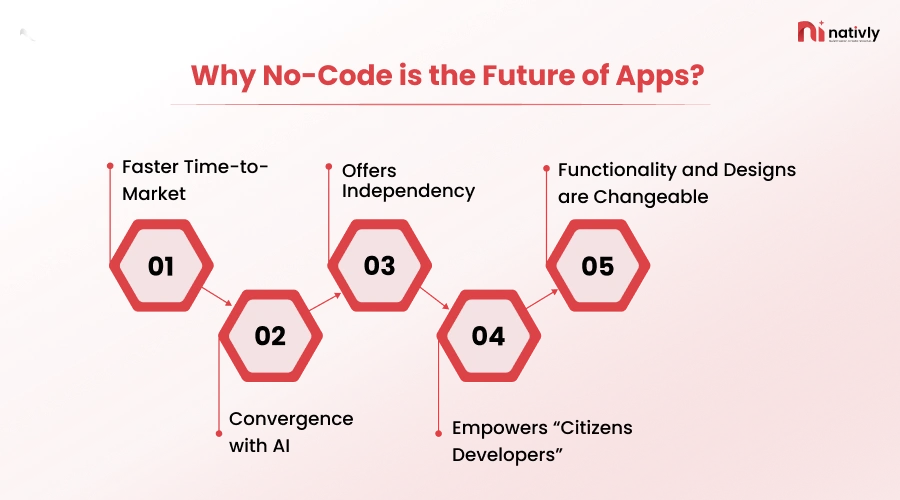
Here, you use visual interfaces, drag-and-drop components, and set up logic through menus. Given below is the list of reasons why no-code is the future of apps:
-
Faster Time-to-Market
No-code platform accelerated time-to-market by 60% to 90% compared to traditional coding. It helps avoid building an app from scratch by providing pre-built templates, automating backend integrations, and enabling users to create, test, and deploy applications without IT bottlenecks.
-
Convergence with AI
The modern no-code platforms are increasingly merging with AI, instead of dragging and dropping do allows the non-engineers to build and deploy software without writing any traditional code. It offers intelligent workflow automation that lets users interact with development tools via natural language.
-
Offers Independency
No-code development offers independence through democratizing the software creation. It does allow non-technical individuals and teams to create and deploy fully automated and functional mobile apps via drag-and-drop components.
-
Empowers “Citizens Developers”
No-code development empowers citizen developers as well as non-technical professionals, who can directly solve workflow problems without waiting for heavily backlogged IT departments.
-
Functionality and Designs are Changeable
The functionality and designs are changeable with less effort than the first-code approach. These designs are changeable via iterative refinement, modularity, and user feedback. Here, a professional without developer skills can change the designs of the app, which can impact the overall functionality of the app.
However, the startups often ask, “How can you create a native iOS and Android app without coding?” Let’s check it out in the following section.
How to Build a Native iOS and Android App Without Coding in 2026?
You need to follow a detailed process for creating a native iOS and Android app without any coding skills in 2026.
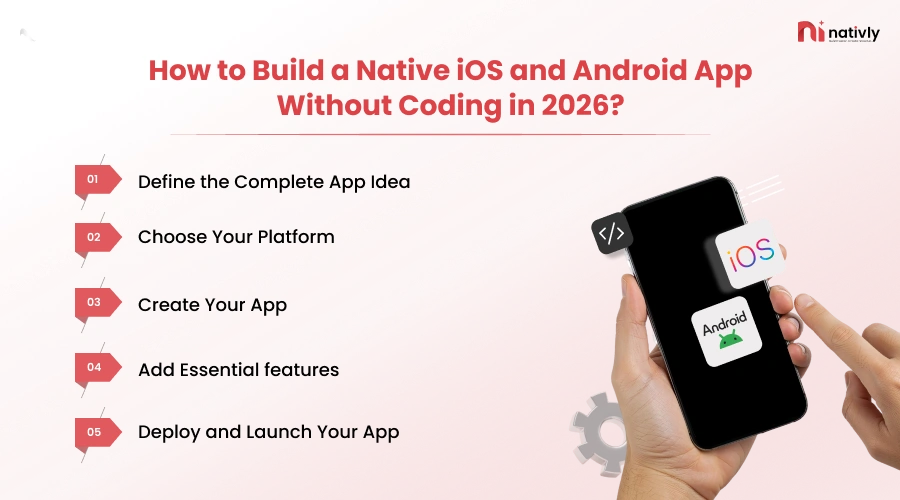
Here is the step-by-step process:
Step 1: Define the Complete App Idea
The foremost step is to define your app idea from a rough concept to a structured product outline. In this step, you should clarify your objectives by mapping the core user platform, outlining the MVP features, and identifying your target audience.
- State the app statement
- Clarify the target audience and personas
- User flow and navigation
- A complete monetization strategy
- Outline the core problem
Step 2: Choose Your Platform
Select the right platform, whether it’s iOS or Android, and clarify the platform requirements so that you can create the app accordingly. Here, you should identify the right no-code platform for creating your app. The selection of a platform directly impacts the success of your app.
- Align the app’s technical requirements with the target audience
- Evaluate the development budget
- State your requirements
- Test several no-code platforms
- Select the no-code plan & pay subscription
Step 3: Create Your App
Now, it’s time to create your app, here you can go from a text prompt to a completely functional database-connected mobile or web app in simple days rather than months. Here are the steps to be followed:
- Describe your app in natural language
- Review the AI’s plan
- Watch it build on the AI platform
- Test and iterate through giving feedback
- Deploy the app with one click
You can choose the best AI app builder, Nativly, to create your app for this platform.
Step 4: Add Essential features
After building the app through AI platforms, you can update the app and can improve it with more commands and features. Here’s how you need to add essential features to your app:
- Connect natural language prompting with drag-and-drop structural design
- Use visual tables
- Craft precise scope prompts
- Embed user authentication via prompts
- Connect to third-party APIs and Payments
Step 5: Deploy and Launch Your App
Now, it’s time to launch the app on the selected platform, just with one click. Even in this process, you should consider the given elements:
- Prepare the store listings and items
- Configure hosting and backend services
- Monitor performance after launch
- Plan for updates and user feedback
Well, if you are confused about the differences between no-code, vs. low-code, and traditional development, let’s check out the following section for the same.
No-Code vs. Low-Code vs. Traditional Development: What’s the Difference?
The major difference between no-code, low-code, and traditional development is in coding requirements, target users, and customization.
In Traditional development, write an application from scratch using advanced programming, while low-code development speeds up the process using visual interfaces and pre-built components, allowing custom code.
However, no-code replaces coding entirely via drag-and-drop features for non-programmers. Here is the list of differences:
| Parameters of differentiation | No-Code | Low-Code | Traditional Development |
| Who uses it | Non-technical founders, business owners | Technical users, developers | Professional dev teams |
| Speed | Days to weeks | Weeks to months | Months to years |
| Cost | $5–$100/month subscription | $50–$500/month | $25,000–$150,000+ |
| Customization | Limited | Moderate | Unlimited |
| Scalability | Low-to-moderate | Moderate | High |
| Best for | MVPs, simple apps, validation | Mid-complexity products | Complex, scalable production apps |
Connect with Nativly and Build Your App Without Any Code
If you are searching for a platform where you can independently create your own no-code app, along with connecting to developers, Nativly AI app builder can help.
We understand that connecting with the platform independently is possible via many platforms; however, if you get stuck with the prompts or identifying what you are exactly looking for, then connecting with the top developers can be helpful.
With Nativly, you will get both the assistance in one place.
Conclusion
Creating a Native iOS and Android app without coding is all about the type of your app, the AI platform you select for no-coding app development, and then deploying the app on the selected platform.
You should write a clear and right prompt after selecting the right platform to build your app. State the clear set of features, select the type of technologies you want to build your app with, and then deploy the app on the selected platform.
Here, another critical thing is that the no-code tool empowers users to create their app. All they need is to select the right platform.
FAQs
Q1. Can I really build a native iOS and Android app without coding?
Yes. Modern no-code and AI-powered app builders let you create native mobile apps using prompts, drag-and-drop components, and visual workflows instead of writing code. You can also test, refine, and publish your app from the same platform.
Q2. What is the difference between a native app and a web app?
A native app is built specifically for iOS or Android and is installed directly on a device. It offers better performance, offline capabilities, and full access to device features like the camera, GPS, and notifications.
Q3. Is no-code app development suitable for startups and MVPs?
Yes. No-code platforms are ideal for startups and MVPs because they reduce development time and costs while enabling founders to validate ideas and gather user feedback before investing in full-scale development.
Q4. What should I do before launching my app?
Before launching, prepare your app store listing, configure hosting and backend services, thoroughly test your app, and ensure it complies with App Store and Google Play guidelines. Monitoring performance after launch is equally important.
Q5. How do I choose between iOS and Android for my app?
Your choice depends on your target audience, budget, business goals, and technical requirements. If you want broader global reach, Android may be a better choice, while iOS is often preferred for premium user segments.
Q6. Can I add new features to my app after it is launched?
Absolutely. Most no-code platforms allow you to update functionality, improve the design, integrate third-party services, and release new features based on user feedback without rebuilding the app from scratch.