Key Takeaways
- Launch is only the beginning: AI-built enterprise apps need ongoing maintenance to remain secure, reliable, and useful.
- A consistent maintenance process covers ownership, documentation, performance monitoring, security, data, and integrations.
- Plan for common risks, including scaling problems, unclear responsibilities, and dependence on a single platform.
- Keep control with clear documentation, named owners, and a defined handoff or exit plan.
- Connect with Nativly, to maintain your complete enterprise AI-built app.
Your AI-built app is launched; now, what happens after that? Who will take care of it without engineers?
Relax!
No need to worry about maintaining an enterprise app built with AI.
If AI has created it, it definitely has the potential to maintain it too. That’s what Nativly says.
But how?
To answer all your questions related to “how to maintain an enterprise app built with AI?”
We’ll walk you through the complete guide that includes all about maintaining an enterprise app, reasons to maintain it, how to maintain it, who is responsible, mistakes, and more.
Let’s get started with the same.
What Does it Mean to Maintain an Enterprise App Built with AI?
Maintaining an enterprise app built with AI means keeping the app dependable and going far beyond fixing standard software bugs.
It is all about maintaining the non-deterministic AI models. Furthermore, it requires managing the overall machine learning models, security governance, as well as the multi-system integrations over the long-term period.
Now, the question arises: “Why maintain an enterprise app built with AI?”
Well, there are plenty of reasons, including accuracy control, security, cost and resource management, API compatibility, and real-world performance monitoring.
Let’s discuss them all one after the other in the following section.
Why Maintain an Enterprise App Built With AI?
The key reasons to maintain an enterprise app built with AI are keeping the app reliable, protecting security, managing the machine learning models, and multi-system integrations.
Here’s all about them, one after the other:
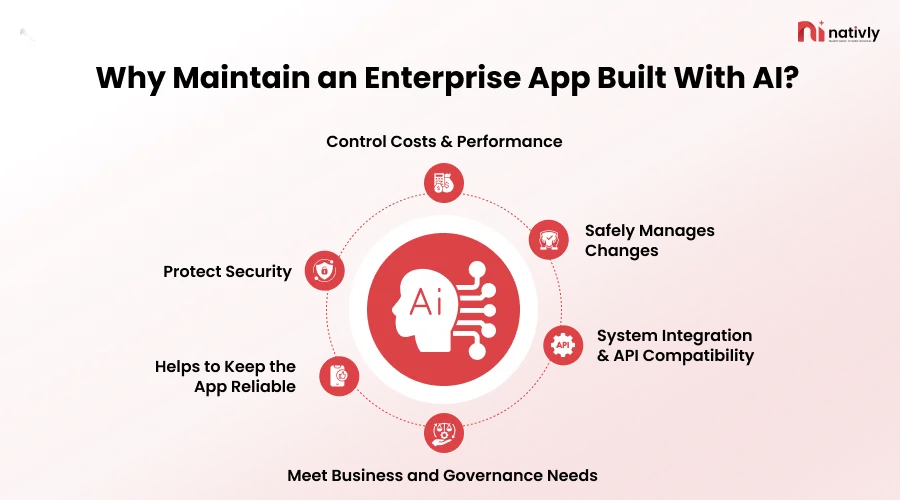
1] Helps to Keep the App Reliable
Maintaining an enterprise app built with AI will help keep the app reliable by finding and fixing bugs, outages, slowdowns, and integration failures.
Further, it helps in bridging the prototype gaps, managing the probabilistic outputs, and even testing the infrastructure.
2] Protect Security
Another key reason is continuously closing the operational gaps, managing model and data drift, and patching third-party integrations.
Maintaining an enterprise app built with AI will mitigate model and concept drift, securing secrets and credentials. It keeps the patch vulnerabilities and connected devices up to date.
3] Control Costs & Performance
Maintaining an enterprise app built with AI controls costs by actively governing model usage and automating lifecycle operations.
Identify inefficient workflows, excessive AI usage, and growing infrastructure needs.
Bonus Read: “How Much Does It Cost to Build a Mobile App Via an AI App Builder?”
4] Safely Manages Changes
Enterprise apps built with AI safely manage the changes through moving away from the quick prototypes, and then adopting a strict, multi-layered engineering and governance lifecycle.
Maintaining an enterprise app built with AI safely manages changes by catching the issues before they impact the business.
5] System Integration & API Compatibility
Maintaining an enterprise app built directly drives the need for system integration & API compatibility.
Because AI models cannot function in isolation, they require continuous, real-time data flow as well as action execution across the fragmented corporate tech stacks.
6] Meet Business and Governance Needs
Maintaining an enterprise app is built to meet specific business and governance needs, ensuring continuous regulatory compliance and long-term system stability.
Keep the app aligned with the changing processes, responsibilities, and applicable oversight requirements.
Now, with the key reasons, let’s get ahead with the complete process of how to maintain an enterprise app built with AI in the next section.
How to Maintain an Enterprise App Built With AI?
Maintaining an enterprise app built with AI requires combining the traditional software lifecycle management with AI-specific monitoring and automated validation.
Here, the AI app builder like Nativly itself provides automated preview and testing environments, performs security scans, mandatory human review gates, and offers release management.
Let’s get started with the process of maintaining an enterprise app built with AI:
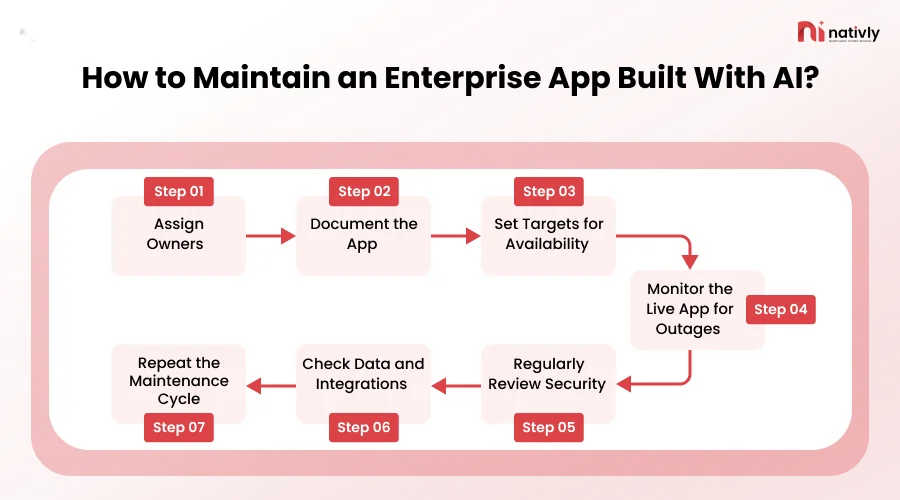
Step 1: Assign Owners
This is the very first step in maintaining an enterprise app built with AI.
Under this step, it is important to separate business and operational ownership from the platform credentials and code repositories.
It’s all about linking the app to the named individual, a team, or a cost center, and a structured handover procedure.
Step 2: Document the App
Documenting an enterprise app build requires you to shift from traditional code-level commenting to managing the prompt context and even AI instructions that act as a true source of truth.
This is the step that requires documenting the workflows, builder configuration, data sources, integrations, and recovery steps.
AI app builders generate code quickly, and documenting intent and constraints prevents the app from becoming a black box no one can maintain. So, documentation is an important step in maintaining an enterprise app built with AI.
Step 3: Set Targets for Availability
Now, in the process of maintaining an enterprise app built with AI, it is important to set targets for availability, response time, errors, user outcomes, and costs.
Setting availability targets requires balancing traditional software uptime (SLAs) with AI-specific non-deterministic behaviors such as model drift, and inference queue depth.
Define the required uptime percentage, over a specific period, based on the business impact, user needs, and recovery requirements.
People also check “A Complete Guide to Building Enterprise Apps with AI ”
Step 4: Monitor the Live App for Outages
To monitor an enterprise app built with AI, it is important to have a dual-layer strategy: traditional infrastructure and APM monitoring combined with specialized AI behavior monitoring.
Implement synthetic monitoring for outer reachability, and an automated alerting pipeline for minimizing downtime.
Also, you can set an availability target by defining the required uptime percentage over a specific period that is based on the business impact, user needs, as well as recovery requirements.
Step 5: Regularly Review Security
Regularly review security as a crucial enterprise app built step is all about validating the security model behavior and compliance requirements.
Under this step, you should scrutinize the app performance and errors, security, user access, data quality, integrations, AI-generated changes, and operating costs.
Key elements comprise access controls, code quality, data privacy and compliance, as well as API integrations.
Step 6: Check Data and Integrations
Checking data and integrations is the key step for AI-driven applications because AI systems do not fail like traditional software.
It is important to implement a comprehensive verification strategy to systematically maintain the data pipelines as well as integration loops powering your AI application.
Also, you should run continuous data integrity and quality checks by implementing strict integration testing, monitor API, monitor API and monitoring connector performance.
Step 7: Repeat the Maintenance Cycle
To effectively maintain an enterprise app built with AI app builder, you should successfully maintain an application built with or by AI, by shifting from the static software updates to a continuous, cyclical feedback loop.
Additionally, to repeat the maintenance cycle as a core, you should treat maintenance as a closed-loop operational routine rather than a one-time clean-up.
Update integrations, SDKs, and dependencies monthly. Additionally, one should review exceptions and failures weekly.
Now, proceeding with the process to maintain an enterprise app built with AI, let’s get ahead with the responsible person in the following section.
Also Read: “How to Choose an AI App Builder for Your Enterprise?”
Who Is Responsible For Maintaining An AI-Built Enterprise App?
Whoever puts the software into production is ultimately responsible for maintaining an AI-built enterprise app, where the ownership is typically divided across specific roles because the AI model itself takes no responsibility for its code.
Basically, as an enterprise owner, you can maintain an AI-built enterprise app with the help of an AI app builder. However, for this, you will be required to connect with a technical expert too, if your app contains useful data.
Here, you can select an AI app builder where connecting with the expert facility is a bonus point for maintaining your app.
Even, when you select AI to maintain your app, there can be certain challenges that an enterprise built AI-bult apps faces. Let’s discuss them in the following section.
Common Maintenance Problems in AI-Built Apps
The common maintenance problems that AI-built applications often suffer from are hidden technical debt and maintenance issues.
Let’s list all the common maintenance problems in AI-Built Apps below:
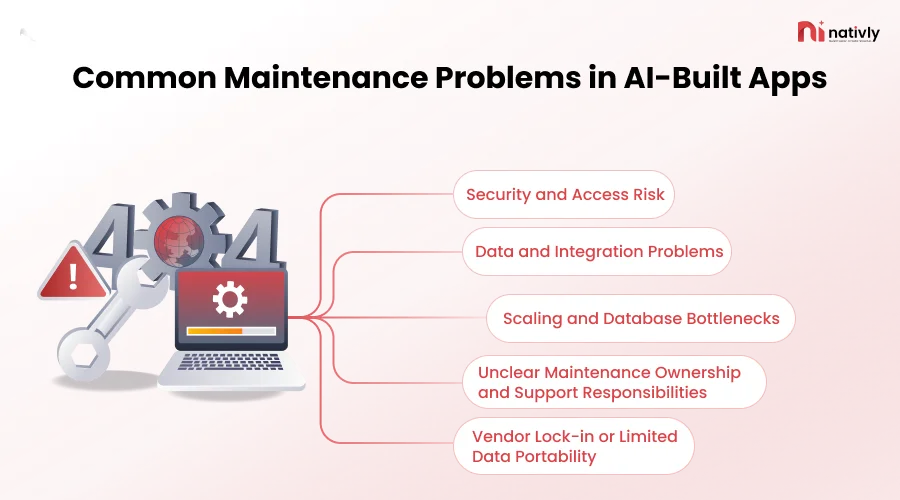
1. Security and Access Risk
One of the most common issues is related to the security of your app’s data because AI coding tools and the integrated models expand the attack surface faster than traditional software controls can adopt.
2. Data and Integration Problems
The data and integration issues are the primary maintenance bottleneck because the AI models rely on continuous, structured, and real-time data flows that constantly break when connected to legacy infrastructure.
3. Scaling and Database Bottlenecks
The Scaling and database bottlenecks are the critical maintenance issues because the AI code generation tools optimize for short-term prototypes rather than the long-term production load.
4. Unclear Maintenance Ownership and Support Responsibilities
Another key issue is related to unclear maintenance ownership because these apps are often created outside formal engineering pipelines by non-technical builders. If the owner of the app is not clear or responsible, app maintenance will get delayed or even not take place.
5. Vendor Lock-in or Limited Data Portability
Vendor lock-in or limited data portability is a major challenge because of application code, prompts, embeddings, and when the fine-tuned models become tightly bound to follow a single maintenance procedure. Enterprises can face challenges in maintaining an AI-built app.
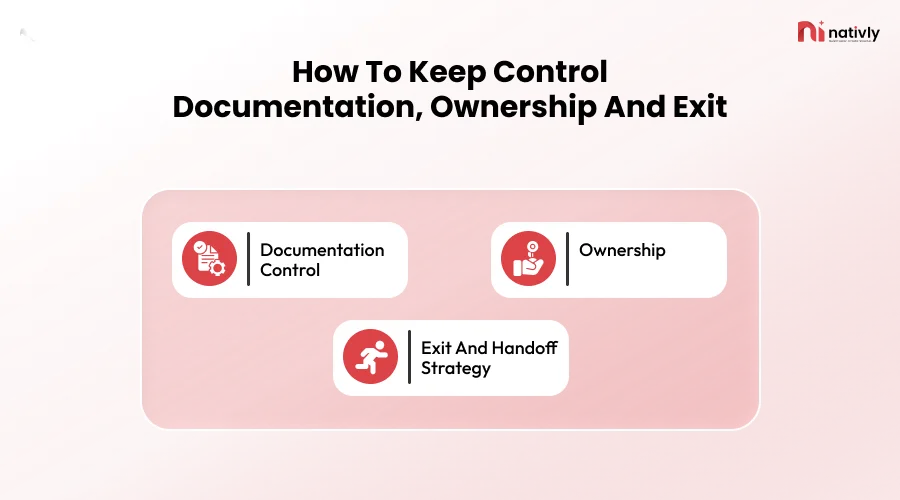
How To Keep Control: Documentation, Ownership And Exit
While maintaining an enterprise app built with an AI app builder, it is important to follow a clear framework for documentation, defined ownership, and a structured exit or handoff plan.
But, as the security of the app is hard to maintain, it is crucial to follow a systematic procedure to maintain control of an enterprise app built with AI:
-
Documentation Control
Documentation control is the fundamental governance mechanism that prevents the operational debt, establishes legal accountability, and then maintains the system integrity. It acts as the ultimate data governance engine and operational anchor.
-
Ownership
Ownership is the primary mechanism because it prevents “operational orphaning”. Here, you should assign responsibility to one person who will be responsible for the app updates and relevant documentation, securing enterprise assets, and operational existence.
-
Exit and Handoff Strategy
The exit and handoff strategy acts as the primary governance mechanism for maintaining control over enterprise AI applications. Unlike traditional software, AI-built apps introduce dynamic behaviors; thus, stating the exit strategy is crucial here.
How Nativly Supports Enterprise App Maintenance?
Nativly supports enterprise app maintenance, as here you can also connect with the experts who can help you to cover the ongoing updates, security patches, compatibility adjustments, and performance optimizations required to keep large-scale business software reliable and compliant.
Nativly ensures the following key kinds of updates:
- OTA Updates: Minor updates to JavaScript, UI layouts, and content deploy live to user devices instantly.
- Cloud Managed Native Builds: Nativly offers cloud-managed native builds through an AI-powered DevOps and internal developer platform (IDP).
- Automated & Managed Certificate Handling: Nativly offers certificate handling by treating digital certificates as first-class, declarative infrastructure resources.
- Offers Proactive Renewal Cycles: Nativly changes the renewals from a reactive, multi-step chore into an automated, continuous background process.
FAQs
Q1. Does an AI-built app need maintenance after launch?
Yes, an AI-built app needs maintenance after launch because it is an app that also needs to have its tech stack changed, and its design is based on current trends and user requirements. Also, it’s better to update the app as per the regulations and rules of the industry.
Q2. How often should you maintain an enterprise app?
You should maintain an enterprise app every 3 to 6 months, and apply immediate patches for security flaws.
Q3. How to update an enterprise app built with an AI app builder safely?
First, it is important to check the policies of an AI app builder with respect to app maintenance. Additionally, to update an enterprise app built with an AI app builder safely, you should assign owners who are responsible for app updates, document the app, set targets for availability, monitor live app outages, regularly review security, check the data, and repeat the maintenance process.
Q4. How to measure whether your app is well maintained?
You can measure whether your app is well maintained by evaluating its effectiveness, tracking a combination of technical stability metrics, code-quality indicators, and user-facing performance trends.