
Key Takeaways
- AI-generated code quality problems mean you face challenges while building an app via an AI app builder. These can be due to weak error handling, high cognitive complexity, and security vulnerabilities.
- Different code quality problems include connection and authentication issues, kernel errors, data processing errors, security risks, weak or missing input validation, along with hardcoded secrets and weak patterns.
- To address the code quality issues, you should write the right prompts, like providing examples, assigning the role, and performing emotional manipulations.
- Partnering with Nativly can help you minimize issues in AI-generated code quality problems, as it is the leading AI app builder, preferred by experts and startups.
43% of AI apps have bugs in production when you use any AI app builder, but why?
Well, there can be plenty of reasons for AI-generated code quality problems, including connection and authentication issues, kernel errors, data processing errors, security errors, and hardcoded secrets.
But why do they occur, and what are the basic parameters that should be considered?
To answer such questions, you can have a 5-minute read where we will walk you through the concept, why such issues occur, and what the actual issues are that you need to consider.
Let’s get ahead of it all together.
What is an AI-generated Code Quality Problem?
AI-generated code quality problems include hidden logic defects, weak error handling, high cognitive complexity, and security vulnerabilities. These assistants are changing the game by offering speed, convenience, and a way to fill knowledge gaps for busy engineering teams.
The core issue is that AI coding assistants don’t inherently understand your application’s risk model, internal standards, or threat landscape.
The initial promise of AI coding assistants was compelling: to democratize software development, accelerate feature delivery, and eliminate repetitive boilerplate.
Here, the problem manifests across different dimensions, including inconsistent architecture patterns, copy-paste proliferation, test coverage gaps, and security vulnerabilities.
Before the issues, one of the questions is: how to create a native iOS and Android app without coding in 2026?
Well, you can create a native iOS and Android app without coding by writing the right prompts, understanding the requirements of your app, checking the security vulnerabilities that can occur due to AI, and even knowing when to skip AI completely.
How does an AI Generated Code Quality Problem Occurs?
43% of AI-generated code requires manual debugging in production, even after passing QA or staging tests. Furthermore, an average of three manual redeploy cycles are required to verify a single AI-suggested code fix in production.
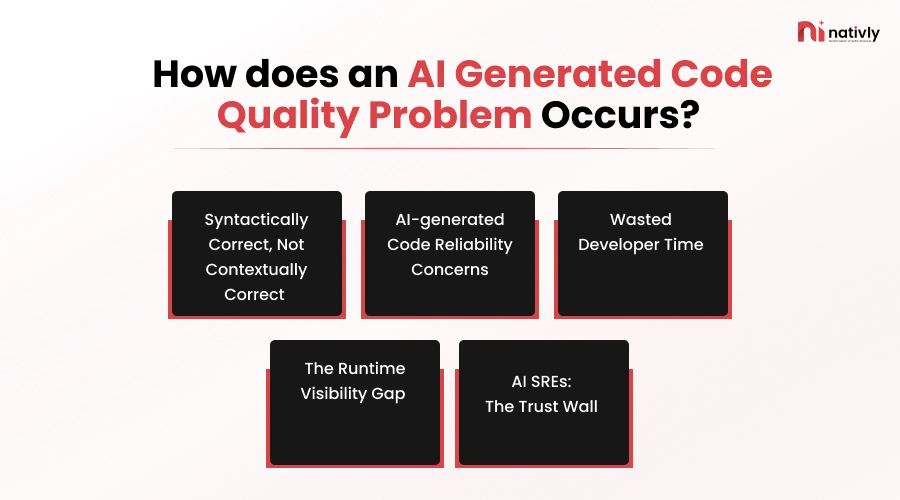
Here’s how does the code quality issues occur:
-
Syntactically Correct, Not Contextually Correct
AI-generated code is syntactically correct when it follows the strict grammar rules of a programming language.
Still, it is often contextually incorrect because the AI lacks a deep understanding of your specific system and architecture.
The AI models are trained on billions of lines of public code, making them experts at predicting the next valid character, keyword, and bracket. However, without business logic, the prompts rarely capture unwritten domain rules.
-
AI-generated Code Reliability Concerns
Another important AI-generated code quality issue is reliability concerns because large language models maximize surface-level syntactic correctness while masking the deep functional and maintenance risks.
Additionally, these AI codes are able to pass basic tests; however, 45% of generated code introduces hidden security vulnerabilities.
Along with this, the AI-generated designs often omit resilience mechanisms such as rate limits, retries, timeouts, or bulkheads unless explicitly requested.
-
Wasted Developer Time
Wasted developer time is a prime code quality issue with AI that dramatically accelerates initial development, and the promised productivity gains disappear in the downstream processes.
Here, the developers do not write the complete code; instead, one of the bottlenecks that they face is related to reviewing, debugging, and maintaining it.
Thus, writing code has become effortless, which further leads to an explosion in volume. When it comes to time management, reviewing and verifying the code is much more time-consuming, and even slower than generating it.
-
The Runtime Visibility Gap
The runtime visibility gap is a dangerous blind spot between static build-time security and live production environments. Here, the gap happens because of the difference between the simulated environment, dynamic production data, and the complicated architecture.
It is a critical driver of major software quality issues because it creates a fundamental disconnect between the code as it is written and the code as it actually runs.
Furthermore, it creates a runtime visibility gap because the coding assistants only analyze the static text and syntax rather than the live execution behavior.
-
AI SREs: The Trust Wall
The trust wall problem refers to the hesitancy of human engineers to allow AI to make autonomous changes to production systems. It is one of the critical barriers where developers stop trusting AI agents to make automated, production-level changes.
It slows down the app because the code generated carries immediate and even real-world risks. Here, SRE tasks often demand real-time automation and even instant responses.
These can even cause rejection of your AI-generated app from the App Store.
This is the issue that traces failures back to the specific bad code and even suggests automated fixes before the issues grow.
What Are the Actual AI-Generated Code Quality Issues That Occur Within AI App Builders?
While building the complete AI app, you might come across diverse issues that consist of connectivity issues, kernel errors, data processing errors, and security risks.
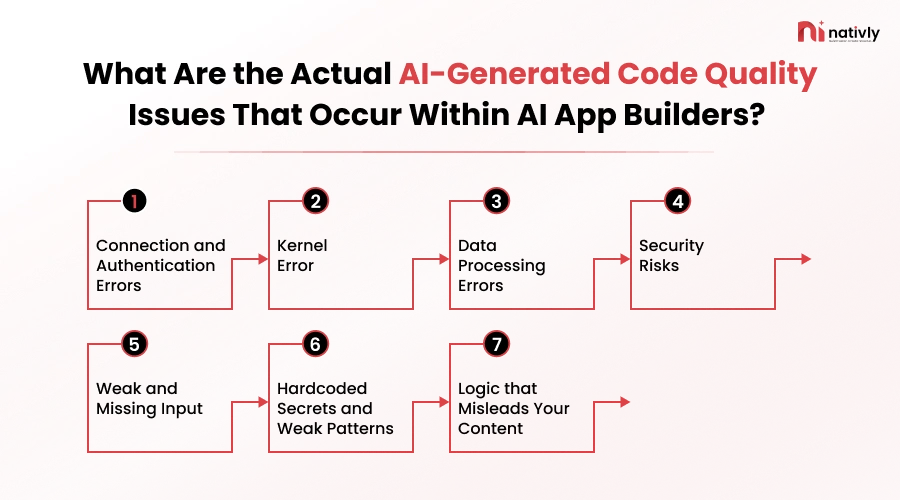
Here is the list of issues that might occur while building with AI app builders:
-
Connection and Authentication Errors
One of the prime errors that you might encounter while building the app is authentication errors in Power Automate that can stop the workflows and even cause delays. Furthermore, these errors usually result from the wrong API or old token settings.
-
Kernel Error
A kernel error in an AI app builder means that the core engine that is running your app has crashed. This can happen when the AI model is not able to handle the data’s complexity, which further leads to workflow breakdowns.
-
Data Processing Errors
Handling data processing errors is key for smooth workflows within AI app builder. Here, errors often happen because of wrong data formats, missing values, and data formats that don’t match.
-
Security Risks
Another core AI-generated code quality problem comprises security risks, where 45% of AI -generated code contains security flaws, which turns what should be a breakthrough into a potential security nightmare.
-
Weak and Missing Input
If your prompt is weak or has missing input, then it can result in an essential error as well as security risks. The AI -generated code skips the clean and clear prompt checks; hence, they design or develops the app as per instructions. Weak or missing input will fail to receive the targeted output.
-
Hardcoded Secrets and Weak Patterns
Hardcoded secrets and weak patterns are one of the core AI-generated code quality problems that might occur in AI app builders. It occurs only when developers embed raw API keys into the system and fail to secure AI endpoints with proper user verification.
-
Logic that Misleads Your Content
If your AI-generated code quality errors mislead your content and resolve the wrong problem, then it is the major AI-generated code quality issue that you should consider. This can impact the complete result of your AI application.
You should note that rising errors will automatically increase the cost to create a mobile app via an AI app builder.
Here, most of the startups and entrepreneurs often ask, “ why 43% of AI apps face bugs in production?”
Well, it can be due to illogical prompts, weak prompts, weak and missing inputs, and kernel errors. In the next section, you will get the right solution.

Why 43% of AI Apps Have Bugs in Production?
Roughly 43% of the AI-generated code changes require manual debugging in production, even after passing standard QA and staging. This is because AI tools are optimized to create rapid single-user prototypes rather than scalable and robust architecture.
Nearly half of all AI-written code changes require manual debugging in production. Not in staging, and not in code review.
This is because the AI tools are optimized for creating rapid single-user prototypes, rather than robust and scalable architecture.
Additionally, the developers now spend an average of 38% of their week, which is almost two complete days, on debugging, verification, and troubleshooting of code that an AI wrote.
Here, the redeploy cycle stat shows that 88% of teams need 2-3 redeploy cycles to fix an AI- suggested fix, and 0% fix it in one try.
Along with this, AI writes the code but misses the implicit conventions. They check assumptions about the data formats, timezone handling, and business rules.
With this in mind, Many of the entrepreneurs and startups often ask, How can I address code quality issues while using an AI app builder?”
You can address these code quality issues by selecting the right AI app builder like Nativly and by combining automated guardrails with manual code reviews and even through clear system prompts.
In the next section, let’s focus on the solutions to AI-generated code quality problems.
How to Address the Code Quality Problems While Using an AI App Builder?
Addressing the code quality issues while using an AI app builder requires you to shift from simple single-prompt generation to structured planning, context grounding, and automated testing.
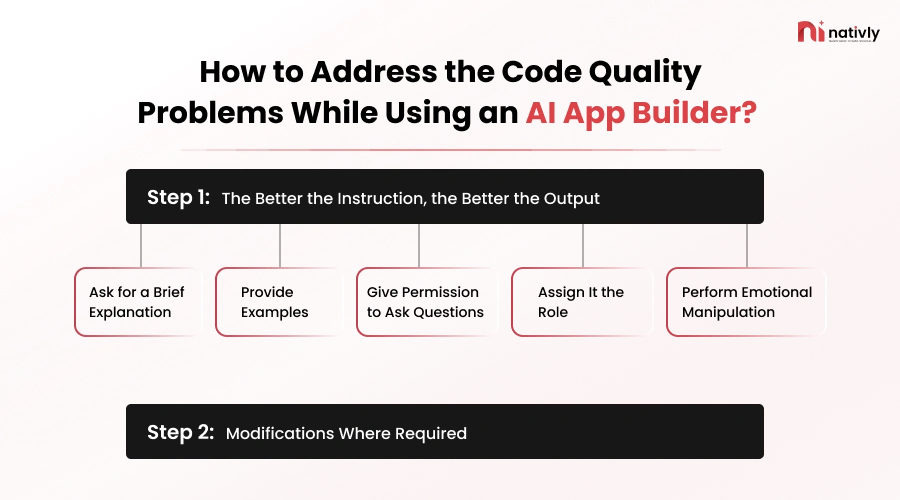
Here is the complete list of practices and strategies to consider while using the AI app builder:
Step 1: The Better the Instruction, the Better the Output
The better your instructions are, the better output you will get; this simply applies whether you are delegating to a junior developer, a contractor, or an AI assistant. It further helps to create more accurate code by reducing confusion and even setting clear rules.
Here are effective AI prompting techniques to adopt while using an AI app builder such as Nativly:
1. Ask for a Brief Explanation
Before you ask the AI to build the complete app, ask it to provide you with a complete explanation of the chain of steps it will go through to develop the complete app or any type of software.
| What are the right steps in the chain of steps you will use to build my app? Specify the right direction you will follow for the same. |
2. Provide Examples
For more clarification to the AI app builder like Nativly, you should provide examples in the prompts that help the builder to understand your intent and what’s in your mind.
| “Here is how we write our API endpoints: [Paste 1-2 examples of your code]
Now, write a new endpoint for ‘User Profile Updates’ using the same style and error handling.” |
3. Give Permission to Ask Questions
For building the complete mobile app or any software, the AI app builder also needs to ask different questions related to the structure, technology guidance, if missed in the prompts, and other crucial considerations. You should permit the builder to ask questions; as you can mention, before writing a solution, ask questions that are necessary.
| Before you get started, ask me for any information or required questions that you need to do a good job. |
4. Assign It the Role
Whatever you are, suppose you are giving the AI app builder to write the code as you would, then make it act like you. Such as, act as a senior developer and create the app.
| Act as a senior Python developer..
Act as a senior UI/UX designer… |
5. Perform Emotional Manipulation
You can ask the AI to concentrate on one part of app development smoothly and precisely. Such as, you can ask the AI to focus on the security, privacy, and error-handling part more specifically.
| For the edge cases, think carefully about privacy; this function processes complete financial transactions. |
Step 2: Modifications Where Required
If, in the result, you saw certain AI code quality-related issues, or the result is not as expected as it needs to be, you are required to perform certain modifications in the code to get the right results.
The other step is to take help from seniors, such as expert developers who can bring the code back online, to assist you with building complete, quality code.
This is how you should know how to get the best out of your AI code assistants.
How Does Nativly Approach the AI-Generated Code Quality Problems Differently?
Nativly is the best AI App Builder that assists users in creating real iOS and native applications using the react native instead of simple web wrappers.
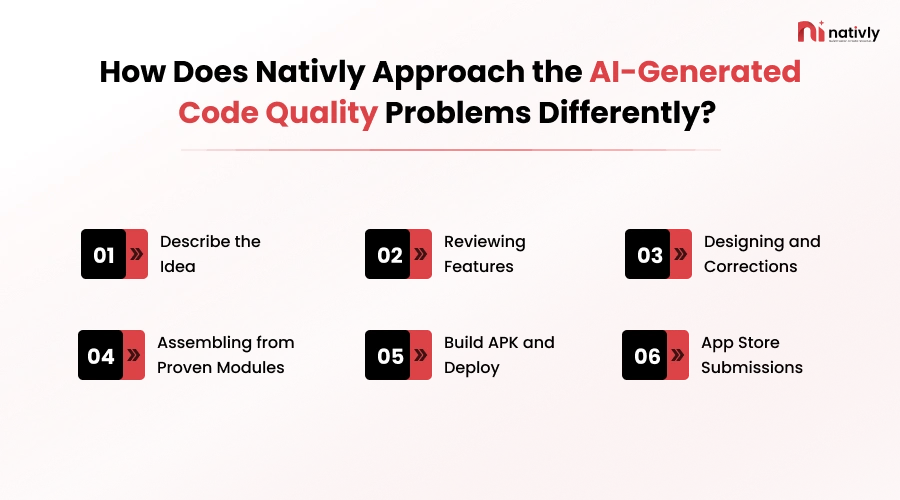
Here, you will be required to follow the simple steps:
- Describe the Idea: State your idea for your app in a descriptive format.
- Reviewing Features: Now, you should review the complete set of features for your AI-generated app.
- Designing and Corrections: Design the complete app and add effective corrections.
- Assembling from Proven Modules: It transforms the responsive websites into native mobile shells and further layers the pre-built layer on top.
- Build APK and Deploy: Now, you should build the APK and then further deploy the app on the respective platforms.
- App Store Submissions: Opt for the right app store submissions by logging in and completing all the submission requirements. Here you should check whether the AI app builder offers you the right submission or not.
Conclusion
The AI-generated code quality problem occurs because of kernel errors, data processing errors, security risks, weak and missing input, hardcoded secrets, along with logic that misleads your complete content.
These errors can occur while creating an app due to runtime visibility errors, AI SREs, wasted developer time, and AI-generated code reliability concerns. The right steps to take here are to write clear prompts and connect with the right team of developers.
FAQs
Q1. Why does AI-generated code fail even after it passes tests and looks correct?
AI writes code that’s syntactically correct but often misses business context, edge cases, or the “why” behind a specific rule. It tests what it expects to happen, not what actually breaks under real-world conditions.
Q2. Is AI-generated code less secure than human-written code?
Yes, generally, AI-generated pull requests show 50–90% more security findings than human-written ones, often from hardcoded keys, weak auth checks, or missing input validation. These issues frequently pass a casual review because the code looks clean. But fails when it comes to complicated tests.
Q3. Can I trust an AI app builder to build a production-ready app?
It depends more on the builder’s architecture than the AI model itself. Builders that generate real, inspectable code and let you test on actual devices are far safer than “black-box” tools where you can’t see or fix what was generated. You may connect to Nativly in this case, as this AI app builder helps to design effective software.
Q4. Why do AI-built apps crash more than traditionally coded apps?
Most AI app builders optimize for the “happy path” shown in a demo, not real conditions like offline mode, denied permissions, or a backgrounded app. Those unhandled device states are the most common source of post-launch crashes.
Q5. Does owning the source code actually reduce bugs, or just make them easier to fix?
It doesn’t stop bugs from being generated, but it changes what happens after: you or any developer can inspect, debug, and patch the exact line causing the issue instead of waiting on a platform update or rebuilding the feature from scratch.
Q6. How many times do teams need to redeploy a fix for AI-generated code?
Industry data shows 88% of teams need 2–3 redeploy cycles to resolve an AI-suggested fix, and essentially none get it right on the first try. Each cycle adds delay, especially painful right before a launch.