Key Takeaways
- AI-generated apps are software that is developed with the help of artificial intelligence, instead of using manual code.
- Key reasons for rejection are poor handling of errors, inaccurate and incomplete app information, in-app purchase violations, broken privacy links, and template clone detection.
- To fix the rejections, read the notice, identify the issue category, fix the root cause, use the appeal process, and then resubmit the app.
- You should build the AI app with resilience capabilities, complying with the in-app purchases and broken privacy policy links to avoid app store rejections.
- Partner with an experienced company, such as Nativly, to get your AI-generated app approved on the App Store.
App got rejected! Again?
In this race to get your AI-generated app approved on the App Store, it is essential to know whether it’s due to the AI app or because of the App Store guidelines.
With every app rejection, your app launch process gets delayed, which impacts your business’s sustainability and overall user experience.
If you are a startup or an entrepreneur struggling with why your AI-Generated app got rejected by the App Store, then it’s the right place to know all the reasons.
In this guide, we will discuss the concept of the AI-generated app, reasons why AI-generated apps get rejected on the App Store, ways to fix it, and a quick summary table of the reasons.
Without any further ado, let’s begin.
What is an AI-generated app?
An AI-generated app is a software applications, are created with the help of artificial intelligence instead of traditional manual coding.
These apps are ideal for a variety of organizations, from startups to global corporations, that want to quickly adopt innovative solutions even without making any kind of upfront investment.
Here’s all about an AI-generated app:
- Generative AI is a type of AI that can create new things such as text, images, music, and even computer code.
- GenAI learns patterns from a lot of data, such as text or code, by using a type of computer system that is called a neural network to understand the data and then build something new from it.
- Instead of writing a single line of code, here the users can create their own app via artificial intelligence (AI).
But the question is “whether Apple is actually banning AI-generated apps?”
Is Apple Actually Banning AI-Generated Apps?
Well, no!
The fact is, Apple is actually banning AI-generated apps for any content or behavior that they believe is over the line.
Here, many of the founders often panic and even assume that Apple has black listed them, but the fact is Apple is not rejecting apps because they are AI generated, its rejecting apps that violate specific, existing guidelines that the AI-generated code tends to violate.
Want to know more about why the AI-generated app got rejected by the App Store?
Most AI startups often ask, “How to develop iOS apps via AI and launch them on the App Store?”
For development, you need a complete process from market research, selection of features, identifying technologies, designing, to its launch in the market.
During the App Store submission process, your app will be reviewed by the App Store. In the case of an AI app, there are chances of it getting rejected.
Not all AI apps get rejected by the App Store; however, if you are going ahead with the AI app, let’s evaluate the reasons that you should be aware of.
Why Your AI-Generated App Gets Rejected by the App Store?
There are many reasons an AI-generated app might be rejected by the App Store. AI-generated apps do not have resilience; vague functionality applications were untouched.
AI apps prioritize building features over compliance; hence, they rarely auto-generate a complete functional policy that violates Apple’s guidelines.
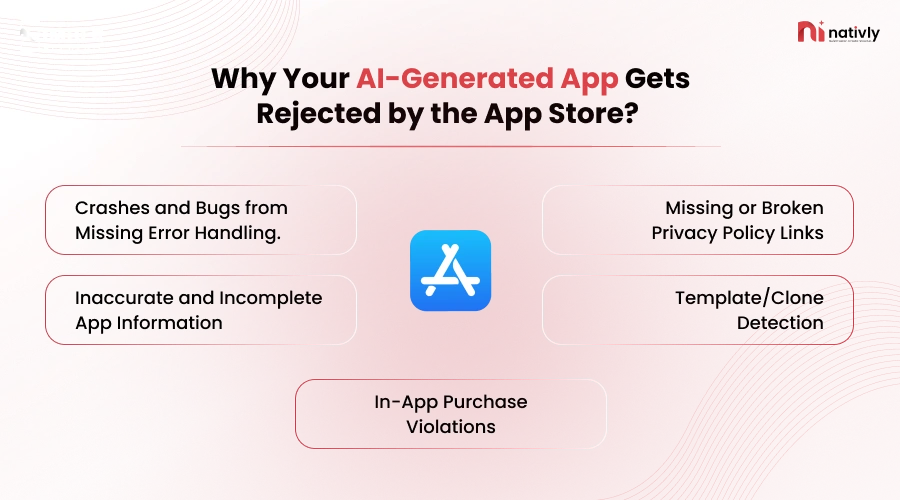
Let’s cover them all here:
-
Crashes and Bugs from Missing Error Handling.
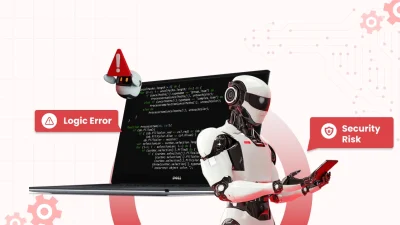
Sometimes the AI-generated code works in ideal situations and breaks down under stress or in edge cases. This is because the App Store’s review process mandates an entirely stable, even uninterrupted, user experience.
Apple has zero tolerance for app policies that crash during review. Here, one crash will result in rejection. The AI-generated apps, in many cases, skip edge case handling and are trained to produce functional code, not resilience.
What triggers app crashes:
- Unhandled errors
- Slow load times
- Memory leaks
Apple takes severe actions, such as rejecting AI apps, when they find that AI apps contain errors; the bugs are not taken seriously, and this results in interrupting the experience of the users in the long run.
Also Read: AI-Generated Code Quality Probelms
-
Inaccurate and Incomplete App Information
In the current era, many startups are using AI to develop automated apps. When one builds an app and launches it on the App Store, one of the crucial pieces of content you place in it is the information about the application.
Incomplete or even inaccurate information about the app can result in the rejection of the app, such as skipping the actual functionality of the app, or what the app is for, and not even having combed through the “Lorem ipsum” text.
What triggers inaccuracy and transparency:
- App’s metadata such as description, pricing, and screenshots
- Could face rejection under guideline 2.3.
- Placeholder text, temporary images, and even coming soon banners.
You should be very well aware of the description that your app requires. If it needs demo credentials or does not have any accurate metadata, this will hamper the user experience, as the users will not be aware of what the app is all about.
-
In-App Purchase Violations
Apple rejects the app for in-app purchases to strictly enforce its monetization policies to the startup and businesses. This policy is applicable when your app sells digital content.
Additionally, relying on additional links, broken transactions, and hidden pricing results in a violation of the in-app purchases policies. AI does not inherently understand Apple’s
StoreKit requirements and generate payment flows that bypass in-app purchases guidelines.
What triggers this:
- Misleading paywall UI
- Broken StoreKit implementation
- Mentioning prices without using Apple’s payment system
- Subscription terms that are not clear
These platforms strictly enforce billing transparency to protect the user’s interest. AI doesn’t understand Apple’s payment requirements; hence, it generates the stripe integration that works well on the web but violates the App Store rules.
-
Missing or Broken Privacy Policy Links
When a business submits its app on the App Store, it should include a complete privacy policy, such as how it will encrypt the user data, what will happen to the data that the app collects, and so on.
Ignoring the complete privacy and security policy in the app will result in rejection. Here, the App Store checks with the GDPR guidelines and CCPA rules. The AI-coded assistance prioritizes building features over compliance, so it rarely auto-generates a complete functional privacy policy that leaves compliance gaps.
What triggers a privacy policy:
- No URL was provided with respect to the privacy policies.
- Uncleared third-party SDKs.
- No data deletion option is provided to the users
- Privacy policy that does not match the app’s functionality.
AI tools do not provide complete privacy policies. Here, AI focuses on the features, not on compliance.
-
Template/Clone Detection
Apple has strict privacy guidelines and rejects the apps that look too similar to the existing apps or appear to be mass-produced from the templates.
A rejection is typically triggered by a missing, non-compliant link and by discrepancies between your policy and your app’s actual behavior.
What triggers a template or clone detection:
- A copied app will automatically result in rejection, whether it’s built with AI or not.
- Apps with the matching architectural structure or a shared third-party wrapper.
- Concept duplication that serves the same purpose.
- Account patterns of the developer.
When it comes to AI apps, well, the AI apps are built on the same architecture and are trained on the existing apps. These apps naturally produces effective designs that look very familiar to the already existing apps. This means your app might be considered rejected when it is based on a similar design or architecture.
These are the reasons why your AI-generated app got rejected by the App Store, but now, the question that most of the startups ask is “how to fix the rejection by the App Store?”
Well, let’s check them all out in the following section.
How to Fix the Rejection by the App Store?
To fix an App Store rejection, one of the most important steps is to read and understand why your app got rejected by the App Store. Then you need to write an appeal.
You can write an appeal after making the changes and submitting it again, or you can write an appeal without making changes and challenging the rejection process.
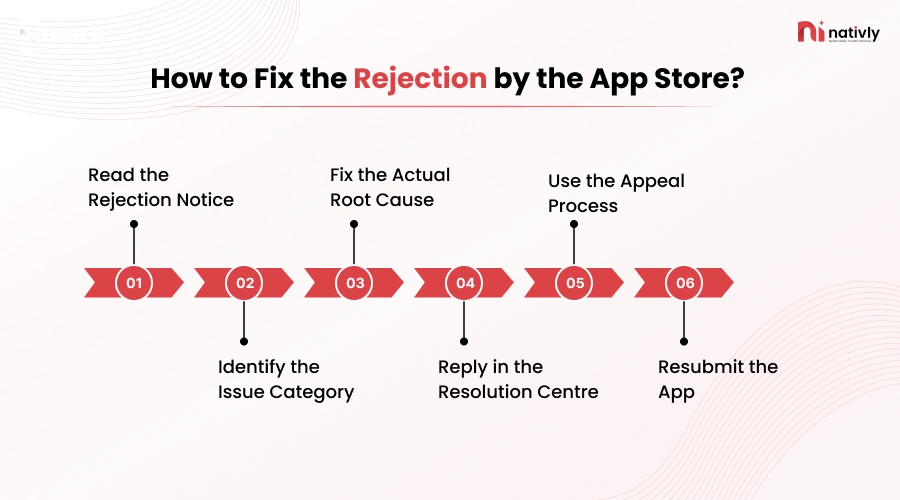
Here’s how you can fix the rejection by the App Store step-by-step:
Step 1: Read the Rejection Notice
This is the first and foremost step where you should be well aware of why your app got rejected.
You should log in to App Store Connect, navigate to the app, check the resolution center, evaluate the guidelines for the rejections, and understand the details related to the guidelines.
Step 2: Identify the Issue Category
Now, you should identify the issue category, such as misleading information, privacy policy issues, crashes or bugs issues, app competency issues, in-app purchase issues, spam and duplicacy issues.
This is the step where you should know the reason well and read it in detail in the App Store guidelines to fix it further.
Step 3: Fix the Actual Root Cause
Now, at this step, you have to fix the actual root cause of your app. No need to just patch the symptoms; understand the issue well, and address exactly what the reviewer flagged. If it’s ambiguous, don’t guess; respond in the Resolution Centre asking for clarification.
You should isolate the reviewer’s exact issue through testing and after fixing the underlying code.
Step 4: Reply in the Resolution Centre
You have a chance to reply in the Resolution Centre. Be specific, polite, and factual while replying to the reviewer about your issue.
Detail the changes that you made or fixed while approving your AI app to the App Store. Under this step, you message the reviewer directly and can even ask what steps you can take to get your app approved on the App Store.
Step 5: Use the Appeal Process
Now, at this step, you should file an appeal that has a clear format, including the name of the app, the guidelines name, and the section.
You should carefully review the store’s violation citation, check for any kind of false positives, and then you can submit factual evidence, stating why you challenge the rejection of the App Store.
Step 6: Resubmit the App
After fixing the issues, or even writing the appeal to the App Store, you can resubmit the app on the App Store. Once fixed, increment your build, update the release notes, and resubmit the app.
You don’t need to restart the whole review queued position. Turnaround is simply one step that can assist you in making the process simple and fast.
Well, as a startup, you might be wondering after a rejection whether you should go for building an AI App or not?
The answer is yes, you can build an AI app; the issue is not AI; the issue is not complying with the App Store guidelines effectively.
Build an AI App Or Not?
Yes, you can still build an AI app for the App Store because the issue is not about creating the AI apps; it’s about building the app by ignoring or violating the App Store guidelines.
Here is the summary of what kind of practices you should follow or take care of while building an AI app to avoid App Store rejection:
| Rejection Reason | Best Practice |
| Harmful/unfiltered AI output | Add content moderation & filters |
| Wrong age rating | Set 17+ if content isn’t fully controlled |
| No moderation for user + AI content | Add reporting/blocking tools |
| Copyright-like AI output | Avoid mimicking known IP; add disclaimers |
| Exaggerated AI claims | Keep marketing accurate, no overpromising |
| Undisclosed data use | Update Privacy Policy & App Privacy label |
| Deepfake/impersonation risk | Block generating real people without consent |
| Thin API wrapper (no added value) | Add unique features beyond raw API calls |
| AI giving medical/legal/financial advice | Add “not professional advice” disclaimer |
Still confused about the app store rejection? You need expert guidance, hire iOS developers, and get your app approved.
How Nativly Can Help You Overcome App Store Rejections
Nativly is the best AI App Builder that knows the tricks and techniques of building AI software and apps that address market competition.
You should connect with the experts at Nativly because:
- Have Proven Expertise: The experts at Nativly have proven expertise in App Store launches.
- Navigating Strict Approvals: whether it’s about safety, performance, business, design, or any legal compliance, our team takes care of every requirement of the app. Our team strictly enforces rules against app cloning, and we require a thorough privacy disclosure and mandate the use of its in-app purchases.
- Experience in AI Apps: Our team has a proven track record in delivering cutting-edge AI with deep specialization in secure, highly compliant sectors such as fintech, healthcare, and banking.
- Opt for a Cloud-Ready Architecture: Nativly is an expert in building an AI -generated app, and our software ensures seamless handling of increased traffic, data, and users without any compromise in performance.
Conclusion
There are many reasons why an AI-generated app got rejected from the App Store, such as crashes and bugs from missing error handling, inaccurate and incomplete information given, missing or broken privacy links, and clone detection.
Key steps to fix rejections are: you should read the rejection criteria carefully, identify the issues, fix the reasons, draft an appeal, and resubmit the app. Here, partnering with an experienced team can be helpful.
FAQs
Q1. Why did your AI-generated app get rejected by the App Store?
AI-generated apps often skip the edge-case handling that makes them more vulnerable to bugs and crashes under real-world stress than manually coded ones. Other than this, AI tools generate descriptions on generic prompts, leaving placeholder text and vague functionality explanations. Other than this, AI does not understand Apple’s StoreKit requirements, which further results in rejection of the app on the App Store.
Q2. What are the right ways to fix rejections on the App Store?
One should follow a complete process beginning with reading the rejection notice, identifying the issue category, fixing the actual root cause, replying in the resolution centre, using the appealing process, and then resubmitting the app.
Q3. If an AI app gets rejected, then whether to build an AI app or not in 2026?
It’s not a fact that only AI apps get rejected on the App Store; apps get rejected because, while building the app via AI, the developers do not take care of parameters such as handling errors by building resilience, or making privacy policy errors, and stating inaccurate or incomplete information in the Metadata. If the developers avoid such errors while building the app on the App Store, they can avoid rejection.
Q4. Is Apple banning AI Apps?
No, Apple is not banning apps or the content that does not serve the purpose of the users and is misleading them. They are banning the apps that do not comply with the policies and regulations of the App Store. The AI apps that do not have resilience to bugs and errors, have mismatched screenshots, apps that do not follow the StoreKit requirements, and avoid the privacy policies.
Q5. How can I launch an AI-generated app on the App Store?
You can launch an AI-generated app on the App Store by complying with the App Store guidelines and policies. Follow the privacy policies and build the features in compliance.